Bought a new computer, switched to a different email provider, or want to set up Outlook alongside your webmail? Setting up email sounds simple, but in practice many people get stuck on server sett...
Bought a new computer, switched to a different email provider, or want to set up Outlook alongside your webmail? Setting up email sounds simple, but in practice many people get stuck on server settings, passwords that aren't accepted, or emails that don't come through. Here you'll find the steps for the most common situations.
Setting up email in Outlook (Windows)
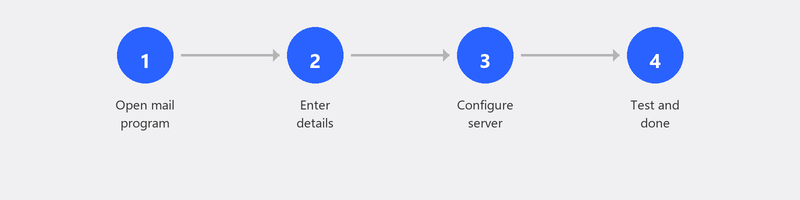
Open Outlook and click File, Add Account. Enter your email address and click Connect. In most cases, Outlook automatically recognizes the correct settings and you only need to enter your password. Does it work automatically? Then you're done.
Outlook doesn't recognize your account automatically? Then you need to enter the server settings manually. You'll need the server type (IMAP or POP3), the incoming and outgoing server addresses, port numbers, and encryption type. You can find this information on your email provider's website.
Setting up email via the browser (Gmail, Outlook.com)

Do you use Gmail, Outlook.com, or Yahoo Mail via the browser? Then you don't need to install anything. Go to the website, log in with your email address and password, and you're done. Webmail works on any computer with a browser, without configuration.
A desktop program like Outlook is handy if you want to manage multiple email accounts from one program, want offline access, or want an integrated calendar and contact list.
Not receiving email? Here's what to check
Not receiving emails when you should be? First check your spam folder. Check if your password is still correct, because after a password change at your provider you need to update it in Outlook too. Check if your mailbox isn't full (many providers have a 5 to 15 GB storage limit for free accounts) and make sure your internet connection is working.
Reducing and filtering spam
Unwanted email is a daily annoyance. In Outlook, you can block senders by right-clicking, Junk, Block Sender. In Gmail, click the three dots next to an email and choose Block. Unsubscribe from newsletters you no longer read via the unsubscribe link at the bottom of the email.
Transferring email to a new computer
Do you use IMAP (the standard for most providers)? Then you don't need to transfer anything. All your emails are stored on the server and appear automatically when you set up your account on the new computer. Do you use POP3? Then your emails are stored locally on your old computer and you need to export them via File, Open & Export, Import/Export.
What's the difference? IMAP synchronizes your email with the server: you see the same inbox on all your devices. POP3 downloads emails to one device and removes them from the server. For most people, IMAP is the better choice.
Need help with email? We'll set it up for you
Email setup is one of our most requested services. Call us and a specialist will configure your email account remotely, test if everything works, and make sure you can start emailing right away.
Need to set up or migrate email? Call +31 10 268 7172 and we'll handle it remotely [link to /remote-help]
Frequently asked questions
What's the difference between IMAP and POP3?
IMAP keeps your emails on the server and syncs them to all your devices. POP3 downloads emails to one device and removes them from the server. IMAP is the better choice for most people because you can access your email from anywhere.
Can I have multiple email accounts in one program?
Yes. Outlook, Thunderbird, and the Windows Mail app all support multiple accounts. Add them via File, Add Account. Each inbox gets its own folder so you can keep them separate.
Why do my emails end up in the spam folder?
There can be several causes: the sender is on a spam list, the email contains suspicious words, or your spam filter is set too aggressively. Mark emails that wrongly end up in spam as Not spam to train your filter.
How do I set up an automatic reply in Outlook?
In Outlook, go to File, Automatic Replies (Out of Office). Turn the toggle on, type your message, and optionally set a start and end date. Your contacts will now automatically receive a reply when you're away.
Can I keep my old emails if I change providers?
If you use IMAP: yes, by adding a new account and dragging the emails from the old to the new account. With POP3, you export your emails to a file first and then import that into the new account.
Need help? We connect remotely.
A specialist looks at your computer remotely. The assessment is free.