You're working and suddenly you hear something. A buzzing sound from your laptop. A ticking noise you haven't heard before. Or a high-pitched beep when starting up. Your first reaction: is this nor...
You're working and suddenly you hear something. A buzzing sound from your laptop. A ticking noise you haven't heard before. Or a high-pitched beep when starting up. Your first reaction: is this normal, or is my computer about to break?
The answer depends on the type of sound. Some sounds are completely normal, others are an urgent warning signal. We explain what each sound likely means and what you can do about it.
Humming or buzzing: the fan
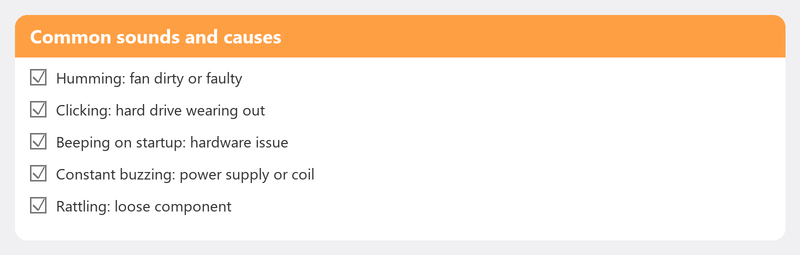
This is the most common sound and usually harmless. Fans spin faster when your computer is working hard (rendering video, gaming, running heavy programs). Once the load decreases, it gets quiet again.
When it is a problem: if the fan is constantly running hard while you're doing nothing, or if the sound is scraping or rattling instead of a smooth hum. Check Task Manager for processes that are straining the processor.
Constantly running at full speed: overheating

If your fan is constantly running at full speed, your computer could be overheating. Most common causes: ventilation openings are blocked (laptop on a pillow or lap), dust has built up in the fan, or the thermal paste on the processor has dried out in older computers.
What you can do yourself: place your laptop on a hard, flat surface. Blow dust out of the ventilation openings with a can of compressed air. For intensive use: consider a cooling pad.
Ticking or clicking: the hard drive
This is a warning signal. A traditional hard drive (HDD) contains spinning platters and a read arm. A rhythmic ticking or clicking sound can mean the read arm is damaged and the drive is about to fail.
What you should do immediately: back up your most important files -- now, not tomorrow. Then shut down the computer and use it as little as possible until the problem is investigated.
Do you have an SSD? Then this sound isn't coming from your storage (SSDs have no moving parts). Look for another source.
Beeping at startup: POST signals
If your computer beeps when you turn it on before Windows starts, these are POST codes (Power-On Self-Test). One short beep is normal -- everything is fine. A pattern of multiple beeps points to a hardware fault, often related to the memory (RAM) or graphics card. The exact meaning varies by motherboard brand.
Rattling or grinding: mechanical problem
A rattling sound can come from a faulty fan (worn bearing), a DVD/CD drive going haywire, or something physically loose inside the case. With a laptop: check if there's nothing underneath the device that's vibrating. With a desktop: check if all cables and components are firmly seated.
Electrical humming or whistling: coil whine
A high-pitched electrical whistling sound during demanding tasks is called coil whine. It's caused by vibrations in the coils of the power supply or graphics card. Not harmful and not a sign of a defect, but can be annoying. On some laptops and graphics cards, it's a known phenomenon that can't be fixed.
Not sure about the noise? Call us
Let us hear the noise over the phone. Our specialists can tell from the sound right away whether it's harmless or whether you need to take action.
Strange noise? Call +31 10 268 7172 and let us listen -- we'll advise right away what you should do [link to /remote-help]
Frequently asked questions
Is it normal for my laptop fan to make noise?
Yes, a soft hum during demanding tasks is normal. Constantly running hard during light tasks may indicate dust or a background process.
When should I be worried?
With ticking or clicking sounds (hard drive), continuous beeping at startup (hardware fault), or a rattling sound you haven't heard before. Always start with a backup.
Can I remove dust from my computer myself?
Yes. Use a can of compressed air and carefully blow into the ventilation openings. Do this outside or in a well-ventilated area. Don't open a desktop's case if you don't know what you're doing.
How do I know if my hard drive is about to fail?
Ticking or clicking sounds are the clearest signal. Other signs: files that suddenly become corrupt, folders that disappear, getting slower when opening files. Check the health with the free tool CrystalDiskInfo.
Does a cooling pad help against a loud fan?
Sometimes. A cooling pad provides extra cooling so the internal fans don't have to work as hard. For a laptop that's overheating due to blocked openings, it definitely helps.
Need help? We connect remotely.
A specialist looks at your computer remotely. The assessment is free.