You've decided: you need a new laptop. You open a website and get buried under hundreds of models, specs that mean nothing to you, and prices ranging from three hundred to three thousand euros. Inte...
You've decided: you need a new laptop. You open a website and get buried under hundreds of models, specs that mean nothing to you, and prices ranging from three hundred to three thousand euros. Intel Core i5 or i7? 8 GB or 16 GB RAM? 256 or 512 GB SSD? It feels like you have to fly an airplane when you only learned to ride a bike.
This article helps you choose. No technical jargon, no endless spec lists. Just clear advice based on what you'll use the laptop for.
Step 1: What will you use the laptop for?
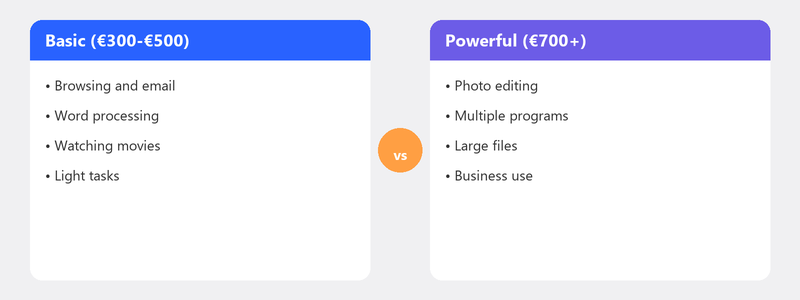
This is the most important question, because the answer determines everything: how much you need to spend, what specs you need, and which type of laptop is the best fit.
- Basic use -- email, internet, word processing, viewing photos: a basic model will do.
- Working from home -- Office, video calls, multiple programs at once: a reliable mid-range laptop with enough RAM.
- Creative work -- photo editing, video editing, graphic design: powerful processor and a good display needed.
- Gaming / heavy use -- 3D modeling, programming, game development: high-end laptop with a dedicated graphics card.
The 5 specs that matter
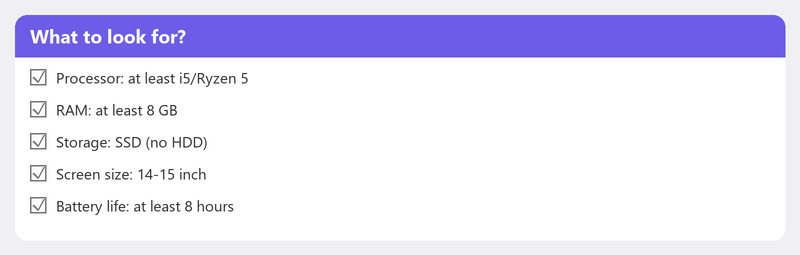
- Processor (the engine). The processor determines how fast your laptop handles tasks. Basic use: Intel Core i3 or AMD Ryzen 3. Working from home: i5 or Ryzen 5. Creative/heavy: i7 or Ryzen 7. Watch the generation: a 13th/14th gen i5 is faster than an old i7.
- RAM (working memory). RAM determines how much you can do at once. 8 GB is the absolute minimum in 2026. Working from home: 16 GB. Creative work: 16 GB or more. Less than 8 GB? Don't buy it.
- Storage (SSD). Modern laptops have an SSD. 256 GB is tight but workable. 512 GB is comfortable. 1 TB if you store lots of photos, videos, or games.
- Screen size. 13-14 inch: compact and light, ideal for travel. 15-16 inch: standard for home use. 17 inch: comfortable at a desk but heavy.
- Battery life. Do you work outside the house? Choose at least 8 hours of battery life. Only at home plugged in? Less important.
Windows, Mac, or Chromebook?

- Windows: The standard for most people. Works with virtually all software and peripherals.
- Mac (MacBook): A good choice if you're already in the Apple ecosystem. Known quality and long lifespan, but more expensive and not compatible with all Windows software.
- Chromebook: Fine for purely online use, but can't run Windows programs. Only suitable if you do everything online.
How much should you spend?
- Under 400 euros: Basic use. Email, internet, simple word processing.
- 400-800 euros: The sweet spot for most people. Reliable i5 processor, 16 GB RAM, and 512 GB SSD.
- 800-1,200 euros: Better screen quality, more powerful processor, more storage.
- Over 1,200 euros: Gaming or professional use. Dedicated graphics card, high refresh rate, premium build quality.
Honest advice: don't buy the cheapest laptop. The extra 100-200 euros for a mid-range model pays for itself in years of extra enjoyment.
Laptop for seniors: extra considerations
- Larger screen (15 inches or more) for readability.
- Comfortable keyboard with adequate key spacing.
- Not too heavy if the laptop needs to be portable.
- Simple operating system -- Windows 11 in standard mode is well-organized.
- Avoid Chromebooks if printing, scanning, or installing programs is also needed.
Tips when buying
- Check the warranty terms: two years is standard, some brands offer three years.
- Consider a refurbished laptop: professionally restored, 30-50% cheaper than new, with warranty.
Bought a new laptop? We'll set it up
Call us and a specialist will set up your new laptop completely remotely: transfer files, install programs, set up email, connect your printer, and configure a backup.
Not sure which laptop to buy? Call +31 10 268 7172 for free buying advice. And once you have it: we'll set it up [link to /remote-help]
Frequently asked questions
Is a more expensive laptop always better?
Not necessarily. Above a certain price point, you're paying for premium materials, a thinner design, or niche features most people don't need. Buy based on your use, not on price.
How much RAM do I need for normal use?
8 GB is the absolute minimum. For working from home with video calls, Office, and multiple browser tabs open simultaneously, 16 GB is strongly recommended. The difference in speed and smoothness is immediately noticeable.
Is a secondhand or refurbished laptop a good idea?
Refurbished is excellent. Professionally inspected, cleaned, and with a fresh installation, with warranty and 30-50% off. Watch the age: a five-year-old refurbished laptop has less future than a two-year-old one.
How long does a laptop typically last?
With normal use, four to six years. After that, updates get slower, the battery lasts less, and new software gets heavier. An SSD upgrade and extra RAM can extend the lifespan.
Can I call you for personal buying advice?
Absolutely. Call +31 10 268 7172 and tell us what you'll use the laptop for and what your budget is. We give honest, independent advice without selling laptops ourselves. And once you have it: we'll set it up remotely.
Need help? We connect remotely.
A specialist looks at your computer remotely. The assessment is free.