Your Instagram is sending messages you didn't write. Your bank reports a transaction you didn't make. Or you get a notification that someone logged into your account from a country you've never be...
Your Instagram is sending messages you didn't write. Your bank reports a transaction you didn't make. Or you get a notification that someone logged into your account from a country you've never been to. You've been hacked. It's an unsettling feeling: as if someone broke into your digital life.
But panic doesn't help. Acting quickly does. Below you'll find a step-by-step plan that works, regardless of what exactly was hacked.
First step: change all your passwords immediately
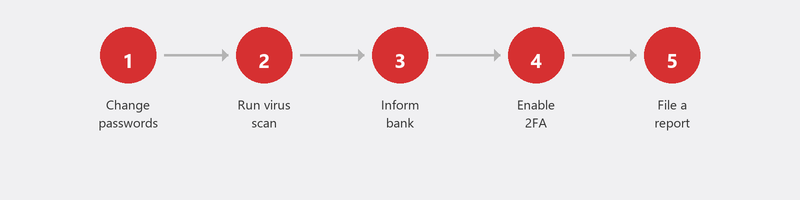
Start with your email account. Why? Because your email is the key to all your other accounts. Through your email, you can reset passwords for your bank, social media, online shops, and government accounts. If a hacker can access your email, they can access everything. Change your email password first, and choose something you don't use anywhere else: at least twelve characters, with letters, numbers, and symbols.
Then change the passwords for your bank, social media, and all accounts where you used the same password as the hacked account. Yes, that's a lot of work. But it's necessary.
Enable two-factor authentication on everything
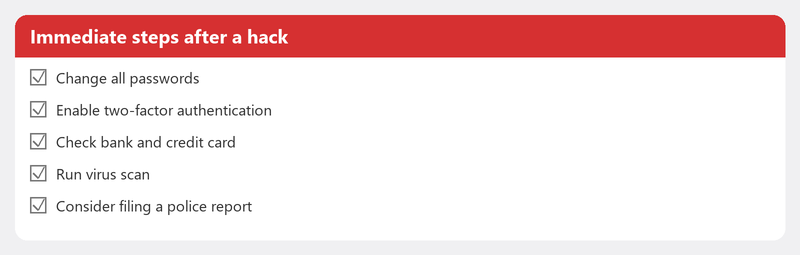
Two-factor authentication (2FA) is the digital equivalent of an extra lock on your door. Even if someone knows your password, they can't get in without the code sent to your phone. Set it up on all your important accounts: email, bank, social media, and government services. It takes five minutes per account and makes your digital life many times more secure.
Social media hacked (Facebook, Instagram, etc.)
Can you still log in? Change your password immediately and check your sign-in activity (on Facebook: Settings, Security and Login; on Instagram: Settings, Security, Login Activity). Remove unfamiliar sessions and enable 2FA.
Can't log in anymore? Use the platform's account recovery procedure. Facebook: facebook.com/hacked. Instagram: tap "Get help logging in" on the login screen. Warn your contacts via another channel (WhatsApp, phone) not to open anything they recently received from your account.
Bank account or payment account hacked
Call your bank immediately. Most banks have a 24/7 fraud hotline. Have your bank card blocked, check your recent transactions, and ask the bank to reverse suspicious transactions. Then file a police report (online at the police website or at the station). Save all evidence: screenshots, emails, transaction overviews.
Computer or phone hacked
If you suspect your device itself has been hacked (unfamiliar programs, strange behavior, unexplained data usage), disconnect from the internet and run a full virus scan. Read our article on removing viruses for the steps. For serious infections (ransomware, rootkit), a complete reinstallation may be necessary.
Filing a report and getting help
For financial damage or identity fraud: file a police report. Also report it to the Fraud Helpdesk. And check your email address on haveibeenpwned.com to see if your data has been leaked in a known data breach.
Prevent it from happening again
Use a password manager (Bitwarden and 1Password are good options) so you can use a unique, strong password for every account without having to remember them. Enable two-factor authentication on everything. Be alert to phishing: read our article on recognizing phishing. And make a backup of your most important files.
Need immediate help? We'll secure you remotely
Don't know where to start? Call us. We check your accounts for suspicious activity, help you change passwords, set up two-factor authentication, and scan your computer for malware. All remotely, while you watch along.
Been hacked and don't know where to start? Call +31 10 268 7172 now -- we'll secure everything remotely
Frequently asked questions
How do I know for sure I've been hacked?
Clear signs: you can't log in even though you're using the right password, contacts receive messages you didn't send, you see unfamiliar sign-in locations in your account settings, or your bank reports transactions you don't recognize. When in doubt: act as if you've been hacked and preventively change your passwords.
Can a hacker watch my computer?
In theory yes, if there's spyware or a trojan on your computer. Signs: your webcam light turns on for no reason, your mouse moves on its own, or programs appear that you didn't open. Immediately disconnect from the internet and run a virus scan.
Should I file a police report if I've been hacked?
With financial damage or identity theft: yes, always. With a hacked social media account without direct damage, filing a report isn't mandatory but is recommended. It helps the police map cybercrime.
How do I make a password that can't be cracked?
Use a passphrase instead of a word: four or five random words together, optionally with numbers and symbols in between. For example: "BlueBike42!RainBarrel". Or use a password manager that generates and remembers random, long passwords for you.
Can I get my hacked Instagram account back?
In most cases yes, but it can take a few days. Use the "Get help logging in" option on the login screen. Instagram asks you to prove your identity, often via a selfie video. Still have your phone number or email linked? That speeds up the process.
Need help? We connect remotely.
A specialist looks at your computer remotely. The assessment is free.