The digital world changes fast. More and more things are done online: banking, contacting your doctor, filing tax returns, video calling with grandchildren. That's convenient if you're comfortable wi...
The digital world changes fast. More and more things are done online: banking, contacting your doctor, filing tax returns, video calling with grandchildren. That's convenient if you're comfortable with it, but frustrating when it doesn't work. And there's absolutely nothing wrong with getting stuck sometimes. We're happy to help you, calmly and at your own pace.
What do we help seniors with?
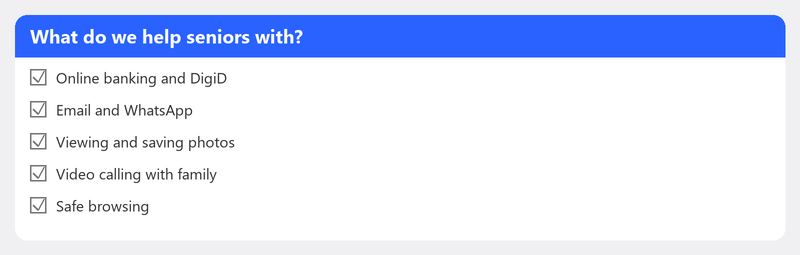
You can come to us for virtually any digital problem. Think of help with DigiD setup or problems, email setup or Outlook issues, video calling with children and grandchildren (Zoom, WhatsApp, FaceTime), installing a printer, help with tax returns, safe browsing and recognizing phishing, setting up a new computer or tablet, and transferring photos.
How does remote help work for seniors?

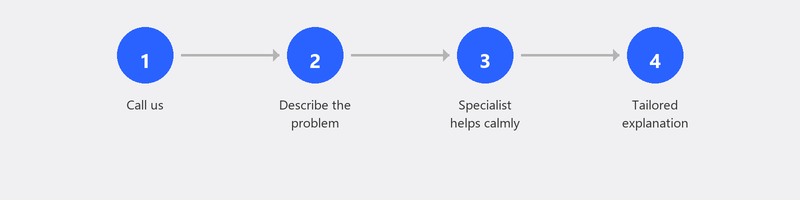
We understand that remote help can feel daunting if you haven't experienced it before. So let us explain. You call us at +31 10 268 7172. A friendly specialist picks up and asks what the problem is. If needed, we guide you step by step to create a secure connection. You enter a code on our website. From that moment, the specialist can see your screen and fix the problem while you watch everything. Once we're done, the connection is closed.
You don't need to install anything beforehand. You don't need any technical knowledge. And if you don't know how to set up the connection, we'll help you with that over the phone too.
Why do seniors choose Tech-Amigo?
Patience. We don't rush. If something needs explaining, we take the time to explain it calmly.
Plain language. No jargon, no technical terms without explanation. We talk the way you talk.
Fixed rates. You know what it costs upfront. No surprises afterwards.
No subscription needed. You call when you need help. No strings attached.
Weekends too. Because computer problems don't stick to business hours.
Your children can arrange it for you
Are you a son or daughter looking for help for your parents? That's absolutely fine. You can call on behalf of your parents and make an appointment. You can sit in during the session, or leave it to us. Many of our clients are referred by their children, and it works perfectly.
Call us for help
Call +31 10 268 7172 and you'll be helped right away. Or leave your phone number and we'll call you back. Read more about how remote help works on our remote help page.
Frequently asked questions
Is remote computer help suitable for people with little computer experience?
Absolutely. That's exactly what we're here for. Our specialists are used to working with people who don't sit behind a computer every day. We explain everything step by step, and you set the pace.
Can my son or daughter call on my behalf?
Certainly. Many of our clients are referred by their children. Your son or daughter can describe the problem, make an appointment, and optionally watch along or handle the payment.
What if I don't know how to set up the connection?
No problem. We guide you through every step over the phone. You just need a working internet connection and a phone. We'll do the rest together.
Is this the same as SeniorWeb?
No. SeniorWeb is a volunteer-based association. We are a professional help service. The key difference: with us, you get an experienced specialist on the line who solves the problem for you, rather than just giving instructions.
Do you also help with tablets and smartphones?
Yes. We help with computers, laptops, tablets, and smartphones. Also read our article on smartphone and tablet help for the elderly.
Need help? Call +31 10 268 7172 -- we'll take our time for you [link to /remote-help]
Need help? We connect remotely.
A specialist looks at your computer remotely. The assessment is free.