Your computer is acting strange. Pop-ups appearing out of nowhere, programs you didn't install, or a browser that keeps jumping to unfamiliar websites. Chances are you're dealing with a virus or ot...
Your computer is acting strange. Pop-ups appearing out of nowhere, programs you didn't install, or a browser that keeps jumping to unfamiliar websites. Chances are you're dealing with a virus or other malware. Don't panic: in most cases, you can fix it yourself by following the steps below.
How do you recognize a virus on your computer?
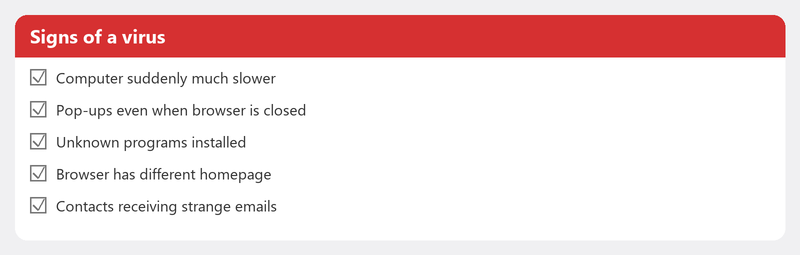
Not every problem is a virus, but there are clear warning signs. Your computer has suddenly become much slower. Pop-ups appear even when your browser is closed. You see programs you don't recognize. Your browser has a different homepage. Contacts are receiving strange emails from your address. If you recognize one or more of these symptoms, it's time to take action.
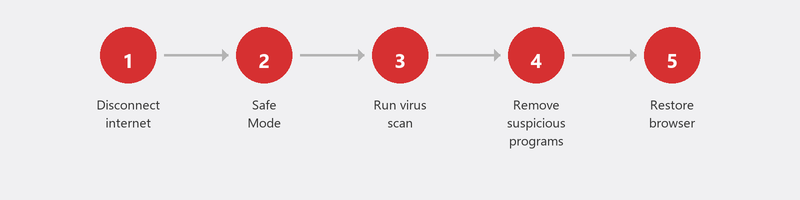
Step 1: Disconnect from the internet
Unplug the network cable or turn off WiFi. This prevents malware from sending data to its creator, spreading further across your network, or downloading additional malicious software. It's a simple step that can prevent a lot of damage.
Step 2: Boot into Safe Mode

In Safe Mode, Windows only loads the most essential components. This means much malware can't become active, making it easier to remove. Go to Settings, System, Recovery, and click Restart now under Advanced startup. Then choose Troubleshoot, Advanced options, Startup Settings, and select Safe Mode with Networking.
Step 3: Run a full virus scan
Windows Defender comes standard on every Windows 10 and 11 computer and is now an excellent virus scanner. Open Windows Security via the search bar, click on Virus & threat protection, and choose Scan options. Select Full scan. This takes longer than a quick scan but checks every file on your computer. Microsoft explains how to stay protected here.
Want a second opinion? Download Malwarebytes (free version). This program often finds malware that other scanners miss. Install it, run a scan, and remove everything it finds.
Step 4: Remove suspicious programs
Go to Settings, Apps, Installed apps. Sort by installation date. Do you see programs you don't recognize or that were installed around the time the problems started? Remove them. Be careful with programs whose names you don't recognize: search the name on your phone first to make sure it's not a system program.
Step 5: Restore your browser
Malware loves to embed itself in your browser. Open your browser settings and check: has the homepage changed? Are there extensions you don't recognize? Is an unfamiliar search engine set as default? Remove anything that doesn't belong and restore the default settings. In Chrome, you can do this via Settings, Reset settings.
When do you need professional help?
With ransomware (your files are encrypted and a ransom is demanded): never pay. Contact the Police and a professional. With rootkits or recurring infections that come back after every scan, there's probably malware running deeper than a standard scan can reach. And if you're unsure whether your computer is truly clean: have it checked.
Also read our article on recognizing phishing to understand how most viruses get in, and our article on what to do when hacked if you suspect there's more going on.
Need help right away? We remove the virus remotely
Don't want to scan yourself, or can't manage it? Call us and a specialist will create a secure connection to your computer. We scan, remove the malware, and verify everything is clean. You watch along on your screen, so you see exactly what's happening.
Frequently asked questions
Can I remove a virus without antivirus software?
In theory, you can manually remove suspicious programs and files, but that's risky. You can easily overlook something. Windows Defender comes standard on your computer and is free. Always use it as a first step.
Is Windows Defender sufficient as a virus scanner?
For most people: yes. Windows Defender scores comparably to paid alternatives in independent tests. Optionally combine it with a one-time Malwarebytes scan for extra certainty.
Should I change my passwords after a virus infection?
Absolutely. Some malware records everything you type (a so-called keylogger). After an infection, change all passwords you've used on that computer, starting with your email and banking. Do this from a different, clean device.
Can a virus permanently damage my files?
That depends on the type. Ransomware encrypts files and makes them inaccessible. Other malware can delete or corrupt files. Regular backups are the best protection against permanent loss.
How much does professional virus removal cost?
At Tech-Amigo, you pay a fixed rate per session. Most virus removals are completed within an hour. You only pay if the problem is actually solved.
Got a virus and can't figure it out? Call +31 10 268 7172 and we'll remove it remotely right away [link to /remote-help]
Need help? We connect remotely.
A specialist looks at your computer remotely. The assessment is free.