You start your computer, type your password, and it doesn't work. You try again and again, but Windows won't let you in. It's an incredibly stressful moment, especially when you're convinced you...
You start your computer, type your password, and it doesn't work. You try again and again, but Windows won't let you in. It's an incredibly stressful moment, especially when you're convinced you're typing the right password. Fortunately, there's almost always a way to regain access.
Step 1: What type of account are you using?
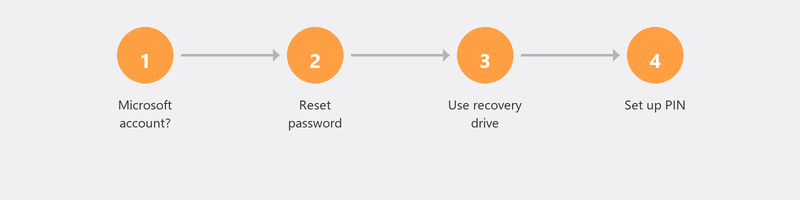
This is the first and most important question. Windows has two types of accounts. A Microsoft account is linked to an email address (often ending in @outlook.com, @hotmail.com, or @live.com). A local account is an account that only exists on this computer, without any link to an email address. You can tell the difference on the login screen: if there's an email address under your name, you have a Microsoft account.
Microsoft account password forgotten

This is the easiest scenario. On another device (your phone, a tablet, a friend's computer), go to account.live.com/password/reset. Enter the email address you use for your Microsoft account. Microsoft sends a verification code to your linked phone number or alternative email. Enter the code, create a new password, and log in to your computer with the new password.
Local account password forgotten (Windows 10/11)
With a local account, you can't reset online. But Windows 10 and 11 offer an alternative: security questions. If you set these up when creating your account, click Reset password on the login screen. Answer the three questions correctly and you can set a new password.
Didn't set up security questions? Then it gets trickier. You can try logging in with a PIN if you set one up (click Sign-in options on the login screen). Is there another account with administrator rights on the computer? Then you can change your password through that account.
Advanced options if the above doesn't work
If none of the steps above work, there are still advanced options. Using a Windows recovery drive or installation media (on a USB stick), you can access the command prompt and reset your password there. This is technical work and there's a risk of accidentally damaging something. Not sure? Better to call us for guidance.
How to prevent forgetting your password again
Use a password manager. Programs like Bitwarden or 1Password securely store all your passwords so you don't have to remember them. Also set up a PIN as an additional sign-in option in Windows (Settings, Accounts, Sign-in options). And if you use a local account: set up security questions. Microsoft explains the sign-in options here.
Can't get in? We'll help you remotely
A locked computer is stressful. Call us and we'll guide you step by step through the recovery process. If your computer shows a login screen (even if you can't log in), we can often help remotely to get you back in.
Frequently asked questions
Can I reset my Windows password without losing anything?
Yes, with a Microsoft account you lose nothing: you only change your password. With a local account and the security questions method, you also lose nothing. Only with a full reinstallation of Windows do you lose data that isn't saved to an external location.
What's the difference between a PIN and a password in Windows?
A PIN is a quick sign-in option that only works on that specific device. Your password works everywhere you use your Microsoft account. A PIN is shorter (four to six digits) and therefore quicker to enter, but offers the same security because it only works locally.
Can I have a professional unlock my computer?
Yes. As long as your computer shows the login screen, a professional can help you regain access in most cases. At Tech-Amigo, we guide you through the process remotely.
Does resetting work if I haven't linked an email address?
If you have a local account without a linked email address, you'll need security questions, another administrator account, or a recovery drive. After resetting, link an email address for the future.
Is my data safe if I reset my password?
With the standard reset methods (Microsoft account online, security questions), all your files and programs remain intact. Only if you choose a full reinstallation of Windows are files deleted.
Locked out and can't get in? Call +31 10 268 7172 for immediate help [link to /remote-help]
Need help? We connect remotely.
A specialist looks at your computer remotely. The assessment is free.