The document you worked on for a week has disappeared. The folder with vacation photos is empty. Or you accidentally emptied the recycle bin and now realize something important was in there. But befo...
The document you worked on for a week has disappeared. The folder with vacation photos is empty. Or you accidentally emptied the recycle bin and now realize something important was in there. But before you panic: there's often still hope.
Step 1: Check the recycle bin
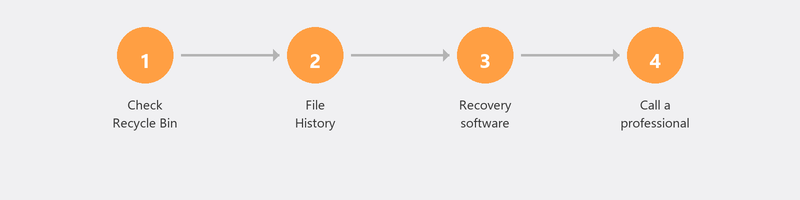
Deleted files first go to the recycle bin. Open the recycle bin on your desktop, find the file, right-click and choose Restore. The file reappears in its original location.
Already emptied the recycle bin? Act quickly: the less you use your computer after deleting, the greater the chance the file can still be recovered. New files can overwrite the spot on your hard drive where the deleted file was stored.
Step 2: Use File History (Windows)

If you had File History enabled, you can restore previous versions. Right-click on the folder where the file was, choose Properties, and click the Previous Versions tab. Do you see a version from before the deletion? Click Restore.
Step 3: Check OneDrive or Google Drive
Do you use OneDrive, Google Drive, or another cloud service? Then there may be a copy of your file online, even if it's gone locally. Log in to the website of your cloud service and check the recycle bin there. Cloud services usually keep deleted files for thirty days.
Step 4: Use data recovery software
If the file isn't in the recycle bin or the cloud, you can try data recovery software. Recuva by Piriform is a free and reliable option. Preferably install it on a different drive than where the file was (for example on a USB stick) to avoid overwriting the deleted data.
The success rate depends on timing: the more recently the file was deleted and the less the computer has been used since, the greater the chance.
Hard drive broken? When professional data recovery is needed
If your hard drive has physical damage (clicking or ticking sounds, no longer recognized), software isn't enough. Professional data recovery takes place in a dust-free room (cleanroom) where the drive is manually read out. This typically costs between 500 and 1,500 euros, depending on the severity.
Prevent data loss in the future
The best protection against data loss is a good backup. With the 3-2-1 rule (three copies, two different media, one at a different location), you're prepared for the worst. Read our article on creating a backup to set it up today.
Need help recovering files?
Call us and a specialist will try to recover your files remotely. We use professional tools and guide you through the entire process.
Lost files? Call +31 10 268 7172 -- we'll try to recover them remotely right away [link to /remote-help]
Frequently asked questions
What are the chances my files can still be recovered?
That depends on three things: how long ago the file was deleted, how much you've used the computer since, and whether the hard drive is physically damaged. For recently deleted files on a working drive, the chances are good.
Can I recover files after emptying the recycle bin?
Yes, with data recovery software. The files aren't immediately erased from your drive when you empty the recycle bin. The space is marked as available, but the data is still there. The faster you act, the greater the chance.
How much does professional data recovery cost?
For software-based recovery done remotely, you pay Tech-Amigo's standard session rate. For physical data recovery by a specialized company, expect to pay 500 to 1,500 euros depending on the damage.
How do I prevent losing files again?
Set up automatic backups. You can back up to an external drive or to the cloud (OneDrive, Google Drive). An automatic backup is the best insurance.
Are my photos automatically saved in the cloud?
That depends on your settings. On an iPhone, photos are saved to iCloud if you've enabled it. On Android, to Google Photos. On Windows, to OneDrive if you sync the Pictures folder.
Need help? We connect remotely.
A specialist looks at your computer remotely. The assessment is free.