
You open a program and nothing happens for ten seconds. Websites load slowly, the fan blows as if your laptop is about to take off, and your cursor just keeps spinning. Sound familiar? Then you've got the ...
You open a program and nothing happens for ten seconds. Websites load slowly, the fan blows as if your laptop is about to take off, and your cursor just keeps spinning. Sound familiar? Then you've got the most common computer problem: a slow computer. The good news: the cause can almost always be tracked down, and the fix is often simpler than you'd think.
Why does a computer slow down?
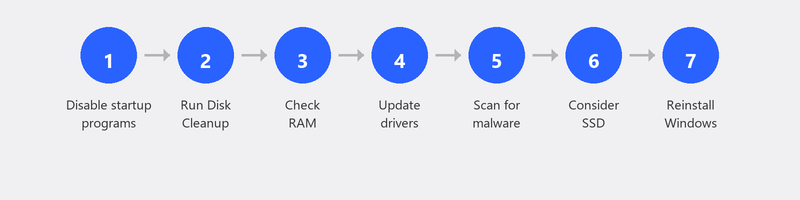
A computer rarely slows down because of one big issue. Usually, small things pile up: programs you've forgotten about, files taking up space, outdated software. The causes generally fall into three categories: software demanding too much, storage filling up, and hardware that needs replacing.
Below, we'll walk through the seven most common causes, with a practical solution you can try yourself for each one.
1. Too many programs starting automatically
Many programs add themselves to your startup list during installation. Spotify, Teams, OneDrive, Adobe, antivirus software: they all launch when you turn on your computer. The result: your computer already has dozens of tasks running before you've made your first click.
The fix: press Ctrl + Shift + Esc to open Task Manager. Click on the Startup tab. Here you can see which programs start automatically and how much impact they have. Right-click on programs you don't need right away and choose Disable. You can always open them manually when you need them.
2. Full hard drive

When your hard drive is more than 85 to 90 percent full, Windows doesn't have enough space to store temporary files. You'll notice the difference in speed immediately. Search for
Disk Cleanup in the Windows search bar and run this utility. It removes temporary files, old updates, and other junk you no longer need. On many computers, this alone frees up several gigabytes. Microsoft explains how Disk Cleanup works here.
3. Not enough RAM (working memory)
If your computer slows down as soon as you open multiple programs at once, RAM could be the bottleneck. Open Task Manager (Ctrl + Shift + Esc), click on the Performance tab, and check the Memory section. If the percentage is consistently above 80 percent, your RAM is probably too limited. For normal use, 8 GB is the minimum in 2026. If you're on 4 GB, an upgrade is worth considering.
4. Outdated software and drivers
Outdated software can contain bugs that slow your system down. Make sure Windows itself is up to date via Settings, Windows Update, and Check for updates. Don't forget your graphics driver either: you can update it through Device Manager. Microsoft shares tips on improving PC performance here.
5. Malware or unwanted software
Sometimes a slow computer is the first sign of a virus infection. Unwanted software can burden your processor and internet connection in the background. Are you also seeing pop-ups, unfamiliar programs, or a browser behaving strangely? Then read our article on removing viruses for a complete guide.
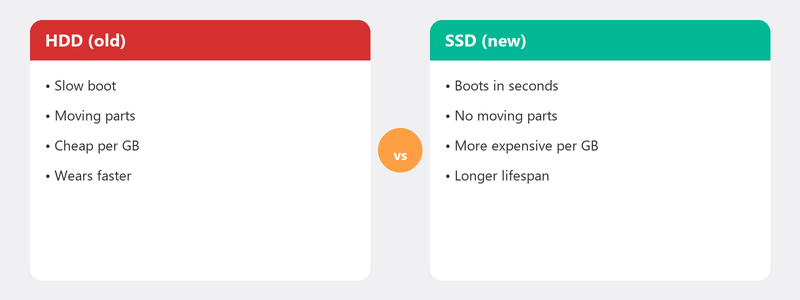
6. The hard drive is old (HDD vs SSD)
Is your computer still running on a traditional hard drive (HDD)? Then that's probably the biggest culprit. An HDD reads and writes data using a spinning disk, which is simply slower than modern technology. Switching to an SSD (solid state drive) is the most noticeable upgrade you can make. Your computer will boot in seconds instead of minutes, and programs open almost instantly.
7. Windows needs a fresh start
Have you tried all the steps above and your computer is still slow? Then reinstalling Windows might help. After years of installations, removals, and updates, the operating system can become cluttered in ways that are difficult to fix manually. A clean installation gives your computer a fresh start. Just make sure to back up your files first (see our article on creating a backup).
Can't figure it out? We'll help you remotely
Some causes are hard to track down on your own. Maybe the problem runs deeper than a full disk or too many startup programs. In that case, give us a call. A specialist will create a secure connection to your computer, look at the issue with you, and fix the problem while you watch on your screen. Most computers are running fast again within 30 minutes.
Frequently asked questions
Why has my computer suddenly become so slow?
There could be several causes: a recent Windows update, a program running in the background, or a nearly full hard drive. Start by restarting and checking if any updates were installed. Often it's a combination of small things that add up.
Does restarting my computer help?
Yes, surprisingly often. Restarting clears temporary files and ends stuck processes. It's not for nothing that it's the first question every helpdesk asks. Always try it as a first step.
Is a slow computer a sign of a virus?
It can be, but it's not the most common cause. A virus usually also causes other symptoms: pop-ups, unfamiliar programs, or strange browser behavior. Running a virus scan is always a good idea if your computer has suddenly become slower.
How much does it cost to have my computer cleaned up?
That depends on the provider and the complexity of the problem. At Tech-Amigo, you pay a fixed rate per session with no hidden costs. Most cleanups are completed within an hour.
When is it better to buy a new computer?
If your computer is more than six to eight years old, has less than 4 GB of RAM, and still runs on a traditional hard drive, buying a new one is often wiser than repairing. Read our buying advice in the article which laptop to buy.
Can't figure it out? Call +31 10 268 7172 and a specialist will look at your screen right away [link to /remote-help]
Need help? We connect remotely.
A specialist looks at your computer remotely. The assessment is free.