Every year again: the tax return. And every year again it has to be done online, through the Tax Authority website, with DigiD. For some people that's a ten-minute job. For others it's a source of s...
Every year again: the tax return. And every year again it has to be done online, through the Dutch Tax Authority website, with DigiD. For some people that's a ten-minute job. For others it's a source of stress, frustration, and procrastination. Sound familiar? Then this article is for you.
What do you need for your online tax return?
Before you start, make sure you have the following at hand:
- A working DigiD (do you still remember your password? Can you log in?)
- A computer, tablet, or phone with internet
- Your annual income statement(s) from your employer or benefits agency
- The assessed property value of your home (on the assessment from your municipality)
- Any deductions (healthcare costs, charitable donations, tuition)
Having trouble with DigiD? Then first read our article on fixing DigiD problems.
Step by step: logging in and filing your return

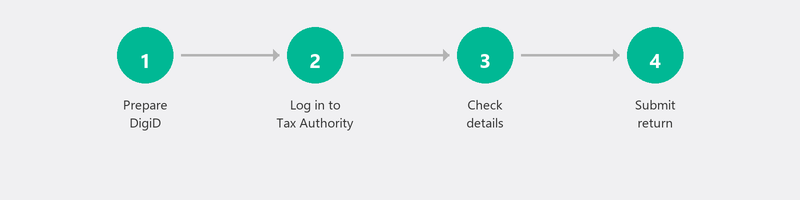
Go to the Dutch Tax Authority website and click Login, then My Tax Authority. You'll be redirected to DigiD. Log in with your username and password, plus the SMS code or DigiD app. After logging in, you'll see your pre-filled return: the Tax Authority has already filled in a lot of information for you based on data from employers, banks, and insurers.
Check all pre-filled information. Are the amounts correct? Is any income missing? Do you have deductions that haven't been filled in? Add these, check everything one more time, and click Submit.
Can't log in? Most common problems
The most common issue is logging in with DigiD. Possible causes: you've forgotten your DigiD password (reset it at digid.nl), your DigiD is blocked after too many failed attempts (wait one hour), the DigiD app gives an error (delete and reinstall the app), or the Tax Authority website is overloaded (try at a different time).
Not working in Chrome? Try Firefox or Edge. Clear your browser cache and cookies. And try on a different device if possible.
Having someone else do your return (authorization)
Can't or don't want to do the return yourself? You can authorize a family member, friend, or tax advisor. You arrange this through the Tax Authority's authorization page. The authorized person logs in with their own DigiD and can then file the return on your behalf. You don't need to share your own login credentials.
Common mistakes in the return
Not all pre-filled data is correct. In particular, check: the number of working days with multiple employers, the amount of savings (the Tax Authority uses the January 1 reference date), and whether your mortgage details have been correctly transferred. Also don't forget to fill in deductions that aren't automatically included, such as specific healthcare costs or charitable donations.
Need help with your return? We help remotely
We offer technical guidance for filing your tax return online: help with logging in, navigating the website, and submitting the return. We don't provide financial or tax advice, but we make sure you get through the technical side smoothly.
Can't get your return submitted online? Call +31 10 268 7172 and we'll walk you through it [link to /remote-help]
Frequently asked questions
Until when can I file my tax return?
The regular deadline is May 1. You can request an extension until September 1 through the Tax Authority website. In special circumstances, further extension is possible.
Can I do my tax return on a tablet?
Yes. The Tax Authority website works on tablets and smartphones. The screen is smaller, but all functions are available. Make sure your DigiD app is installed and working.
What if the pre-filled data is incorrect?
You can adjust the data in the return. The Tax Authority checks afterwards whether the adjusted data is correct. Keep supporting documents (pay slips, annual statements) in case questions arise.
How do I authorize my son or daughter for my return?
Go to the Tax Authority's authorization page and log in with your DigiD. Choose the authorization type "income tax return." Enter the social security number of the authorized person. That person can then file the return on your behalf using their own DigiD.
Do I have to pay for help with my return?
At Tech-Amigo, you pay the standard session rate for technical guidance. We don't provide financial advice, so there are no extra costs for advisory services. The free Tax Information Line can help you with content questions about your return.
Need help? We connect remotely.
A specialist looks at your computer remotely. The assessment is free.