There's an email in your inbox from PostNL. Your package couldn't be delivered and you need to click a link to schedule a new delivery attempt. The logo checks out, the email looks real. But it's ...
There's an email in your inbox from PostNL. Your package couldn't be delivered and you need to click a link to schedule a new delivery attempt. The logo checks out, the email looks real. But it's fake. And if you click that link, you're giving a criminal access to your data. This is phishing, and it happens to thousands of people every day.
The good news: phishing emails can be recognized if you know what to look for. In this article, you'll learn the seven most important warning signs, and what to do if you've already clicked on a link.
What exactly is phishing?
Phishing is a form of online fraud where criminals impersonate a trusted organization. They send you an email, text, or WhatsApp message that looks like it comes from your bank, the tax authority, a postal service, or a webshop. The goal: to trick you into clicking a link and entering your login credentials, bank details, or personal information on a fake website.
7 characteristics of a phishing email
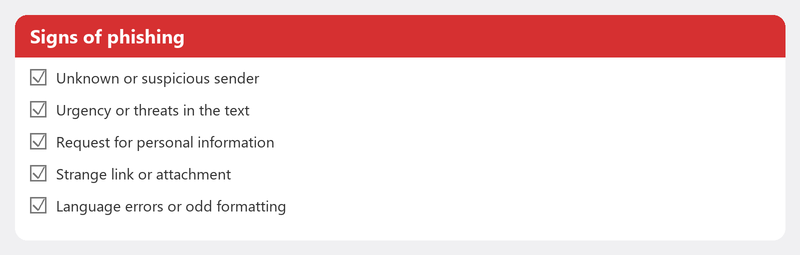
- Unexpected message. You receive an email about a package you aren't expecting, an invoice you don't recognize, or an account you don't have. That's the first red flag.
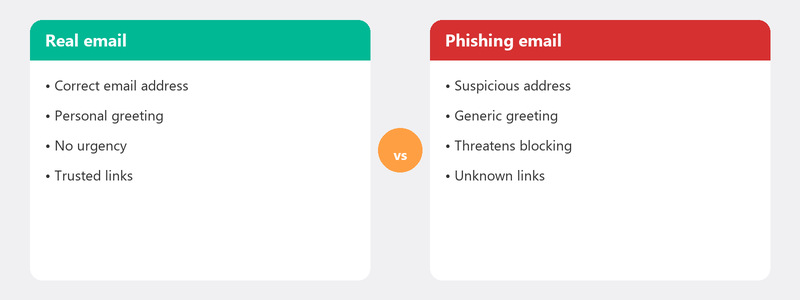
- Urgency or threats. The email insists on immediate action: your account will be blocked, you must pay within 24 hours, a fine will follow. Real organizations rarely threaten via email.
- Strange sender address. The name says "ING Bank," but the email address is something like noreply@ing-security-now.com. Click on the sender name to see the real address. Doesn't the domain match? Don't open it.
- Spelling mistakes and awkward phrasing. Although phishing emails are becoming increasingly professional, small language errors, odd punctuation, or strange translations still regularly give them away.
- Suspicious link. Hover your mouse over the link without clicking. At the bottom of your screen, you'll see where the link goes. Does the address differ from the official website? Don't click.
- Request for personal information. Your bank, the tax authority, and DigiD never ask for your password, PIN, or social security number via email. Never.
- Unexpected attachment. An invoice attachment you weren't expecting? A .zip or .exe file? Don't open it. Attachments can contain malware.
I clicked on a phishing link: what now?

Did you click on a link but didn't fill in anything? Then there's probably nothing to worry about. Close the tab and run a virus scan just to be safe.
Did you enter your information? Then act quickly. Immediately change the password for the account you entered. Is it bank details? Call your bank immediately to have your card blocked. Enable two-factor authentication on all your accounts and run a full virus scan on your computer.
I entered information on a fake site: what now?
This is the most serious scenario. In addition to changing passwords and calling your bank, it's wise to file a report with the Police and report it to the Fraud Helpdesk. Keep a close eye on your bank statements for the coming weeks.
How to prevent phishing in the future
The golden rule: never click on a link in an email if you weren't expecting it. Always go to the website yourself by typing the address into your browser. Install two-factor authentication on your most important accounts. Keep your computer and browser up to date. And if you're unsure about an email: trust your instinct.
Unsure about an email? We'll help you right away
Have you received a suspicious email and aren't sure if it's phishing? Or have you already clicked on a link and want to know if there's damage? Call us. We'll assess the email, check your computer, and secure your accounts if needed.
Received a suspicious email or already clicked? Call +31 10 268 7172 and we'll check it for you right away [link to /remote-help]
Frequently asked questions
Can I get a virus just by opening a phishing email?
Opening an email (without clicking links or opening attachments) is safe in most cases. The risk is in clicking links and opening attachments. Delete suspicious emails without opening them if you're in doubt.
How do I report a phishing email to my bank?
Most banks have a special email address for reporting phishing. Send the suspicious email as an attachment to that address. Your bank investigates it and can have the fake site blocked.
What's the difference between phishing and spam?
Spam is unwanted advertising: annoying but usually not dangerous. Phishing impersonates a trusted party and actively tries to steal your information. Spam is an annoyance; phishing is a threat.
Are phishing emails also sent via WhatsApp and text?
Absolutely. Phishing via text is called "smishing" and via WhatsApp it's becoming more common. The techniques are the same: an unexpected message, urgency, and a link to a fake site. The same recognition rules apply.
How do I know if a link is safe before I click on it?
Hover your mouse over the link without clicking. You'll see the actual web address appear. Does the address contain strange characters, a weird domain, or doesn't it look like the official website? Then it's suspicious. When in doubt: type the address yourself in your browser.
Need help? We connect remotely.
A specialist looks at your computer remotely. The assessment is free.